

Lead Seperation BOT

Diamond AI Agents Hackathon
Durgesh Chandra • Founder – Devnox India Pvt. Ltd. | SAP PM Specialist | AI Tools Trainer | Deputy Manager (Plant & Machinery)
Tools: N8N,GMAIL,And Excell Sheet
Description: Automating Lead Separation with AI + Sheets + Gmail

Detailed Description

🚀 Automating Lead Separation with AI + Sheets + Gmail

Managing leads manually can be a real headache 😓—duplications, missed follow-ups, and lost opportunities. That’s why I built this Lead Separation BOT 🎯

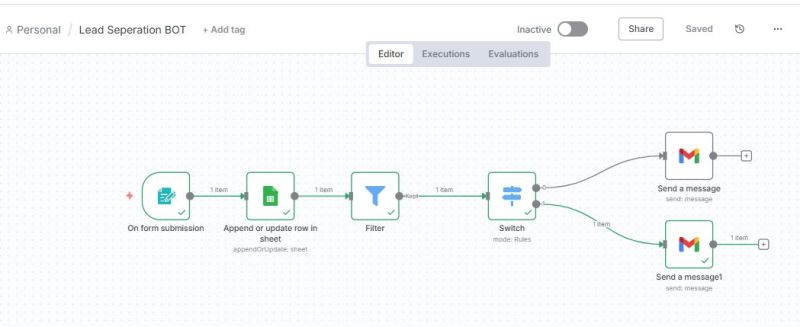
✅ Captures every new form submission
✅ Updates Google Sheet automatically (no manual entries!)
✅ Applies a Filter + Switch logic to segment leads instantly
✅ Sends the right email to the right segment 💌

All in real-time ⚡, ensuring zero leads fall through the cracks.
This is how automation saves time, effort, and mistakes while keeping your sales pipeline flowing smoothly.

👉 Curious? Imagine scaling your workflow without extra manpower—just smart automation.

Would you like me to break down step-by-step how I built this BOT so you can create your own? 💡

hashtag#Automation hashtag#LeadGeneration hashtag#AItools hashtag#Productivity hashtag#NoCode

Loading AI Review…
Booting AI Coach…

Submission Review & Analysis

✨ Summary: The Lead Separation BOT automates the process of managing leads by integrating Google Sheets and Gmail, ensuring efficient segmentation and communication. 💪 Strengths: ✅ Streamlined lead management reduces manual errors and saves time. ✅ Real-time updates to Google Sheets enhance data accuracy and accessibility. ✅ Effective use of AI for lead segmentation improves targeting in communications. ✅ Automation of email responses ensures timely follow-ups with leads. 🧑‍💻 Gaps / Risks: ✅ Dependency on third-party services (Google Sheets, Gmail) may introduce integration issues. ✅ Lack of user feedback or testing data could affect reliability in diverse scenarios. ✅ Potential for over-segmentation if filters are too strict, leading to missed opportunities. ✅ Limited visibility into the decision-making process of the AI could hinder troubleshooting. 🚀 Actionable Next Steps: ✅ Test the BOT with a diverse set of lead data to ensure robustness and adaptability. ✅ Gather user feedback to identify areas for improvement and enhance user experience. ✅ Consider adding logging features to track lead processing and identify bottlenecks. ✅ Explore additional integrations (e.g., CRM systems) to expand functionality. ✅ Create a detailed guide or tutorial to help others replicate the BOT effectively.
Smart AI Review. Work on each pointer shared to make your project perfect.

AI Coach (asks anything about this submission)

Hey! I’ve gone through the submission. Ask me anything — gaps to fix, better tools, next steps, whatever you need.

Community Feedback

  • Anilgiri • 4 months ago
    nice bot
  • Pooja • 4 months ago
    nice
  • Gorakh • 5 months ago
    This is a fantastic bot.
  • Ritika • 5 months ago
    sir please check this as I cannot see the demo video or the Bot working
  • Durgesh Chandra • 5 months ago
    🚀 Great use of AI + Sheets + Gmail for lead management! A quick demo or step-by-step guide would make it even more valuable for others to replicate 👏
Created with ❤️ by Growthyfai

Responses

  1. 🚀 Great use of AI + Sheets + Gmail for lead management! A quick demo or step-by-step guide would make it even more valuable for others to replicate 👏

Comments are closed.